Intro
LLMs are typically limited to datasets used for their training. The widespread adoption of LLMs increased the need for them to operate on updated information, such as company policies or current events, without having to retrain them. Training them in the first place is costly, and retraining them doubly so.
Enter Retrieval Augmented Generation (RAG): the process of generating and collecting relevant context to feed it to a LLM. First introduced in 2020, RAG reduces hallucinations significantly when LLMs don't have access to particular information. The 'generation' - the LLM query - is augmented by information retrieval.
Legal documents, from contracts to case law, are constantly evolving. Purpose-built models naturally close the gap with updated information and ensure search and retrieval remains accurate.
It's easier to think of it in two parts:
- Part A: Creating the updated information source.
- Part B: Feeding the updated context to a LLM.
Part A, in which we create order from chaos:
- Dataset: have a dataset, ideally updated.
- Semantic splitting: split the dataset into chunks with meaning.
- Embedding: convert the chunks into vectors.
- Storage: store the vectors in a database.
Chunking can be done without meaning, such as splitting sentences by character count. Keeping them meaningful improves LLM answers.
Vectors are numerical representations of a thing, which makes embeddings numerical representations of text.
Part B, in which we generate more accurate answers:
- Input: someone – or something – provides input, like a question.
- Retrieval: get the relevant documents based on the input.
- Reranking: reorder the chunks according to relevance.
- Prompting: Feed the ranked list to the LLM before the answer is generated.
It's like forging a gold ring but preemptively imbuing it with powers before it gets used.
Just less malevolent.
flowchart LR
    D[Dataset] --> S[Chunk] --> E[Embed] --> V[Store] --> R[Retrieve] --> K[Rerank] --> P[Prompt LLM] --> A[Answer]

    Q[Question] --> R
Prerequisites
- Appropriate setup (Ubuntu/Debian systems with venv).
- Python 3.10+ and pip installed.
- An Isaacus account and API key.
- A Google AI Studio API key for Gemini 2.5 Pro.
1. Setup
The journey of a thousand documents begins with a single pip install.
1. Install all the packages.
pip install isaacus semchunk datasets langchain langchain-core google-genai transformers tqdm python-dotenvRequired packages:
isaacus: Official Isaacus SDK with custom Kanon 2 embedding and reranking models.semchunk: Isaacus' open-source semantic chunking library.datasets: Hugging Face library to download datasets.langchain/langchain-core: used for LangChain's in-memory vector store and RAG abstractions.google-genai: Calls Gemini.transformers: Hugging Face library for loading tokenisers. Required by semchunk to use the Kanon 2 tokeniser.
Optional packages:
tqdm: Progress bars, which we use for looking at embedding progress.python-dotenv: Load local environment variables.
2. Create an .env file with your API tokens:
ISAACUS_API_KEY=your_isaacus_api_key_here
GOOGLE_API_KEY=your_google_api_key_here
3. Create a new file rag.py.
import os

from dotenv import load_dotenv
from tqdm import tqdm
from isaacus import Isaacus
from google import genai

load_dotenv()

isaacus_client = Isaacus(api_key=os.getenv("ISAACUS_API_KEY"))
gemini_client = genai.Client(api_key=os.getenv("GOOGLE_API_KEY"))
2. Load High Court of Australia data
It's time for our little file to grow up. We'll be adding some imposing High Court of Australia data on Hugging Face.
Indicated by the number of rows on the right, there are 8,096 cases.
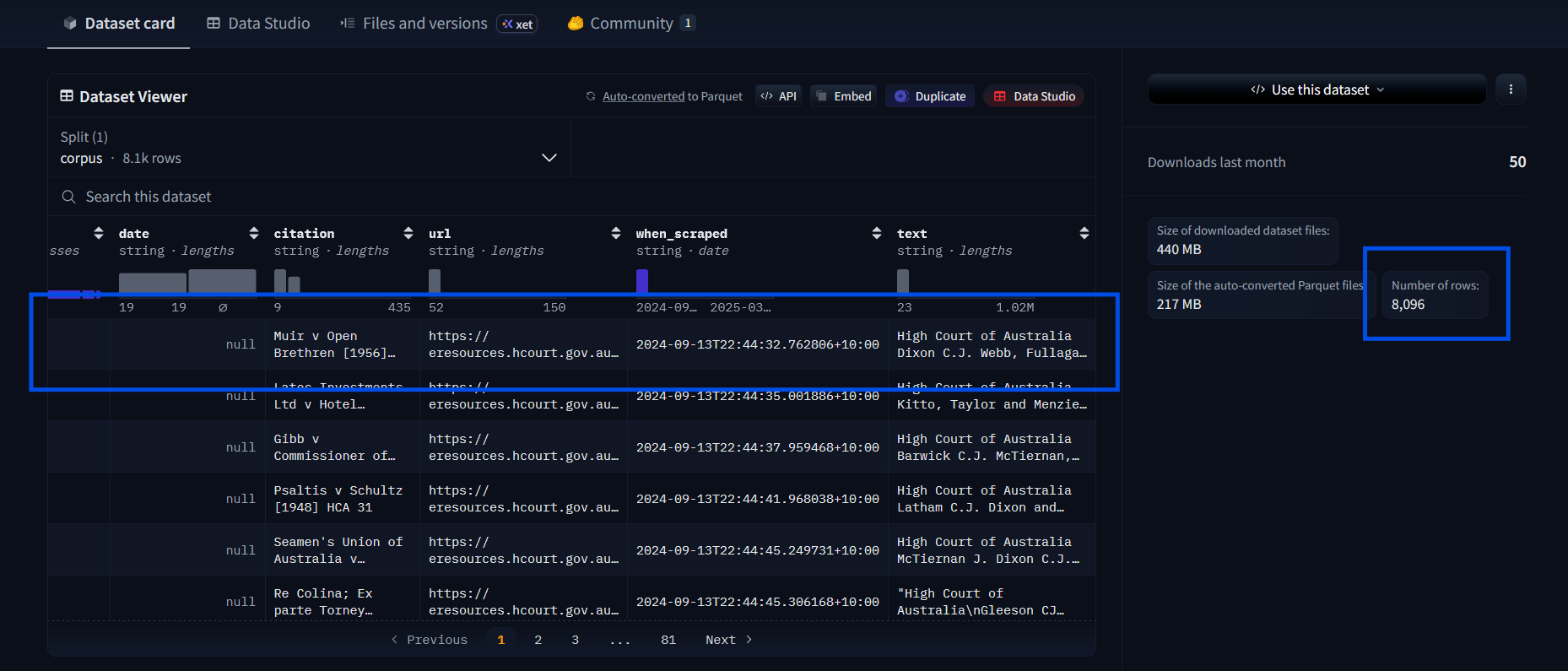
These are full court cases, which can be tens of thousands of words. You can view them by clicking on a row in the Data Viewer and then scrolling through the columns to the right. Load them all at your peril (i.e. don't! At least not at first).
Load them into the file:
## Loading the dataset
from datasets import load_dataset

dataset = load_dataset("isaacus/high-court-of-australia-cases", split="corpus")

# Delete these after testing
print(f"Loaded {len(dataset)} cases")
print(f"First case citation: {dataset[0]['citation']}")
print(f"First case text preview: {dataset[0]['text'][:200]}...")datasetcontains rows with dictionary keys like"citation"and"text".split="corpus"- Hugging Face typically organises datasets into subsets liketrain,test, etc. This one has a 'split' calledcorpus, where corpus is 'all the data'. Choosing a data subset makes the returned data type simpler.
Result
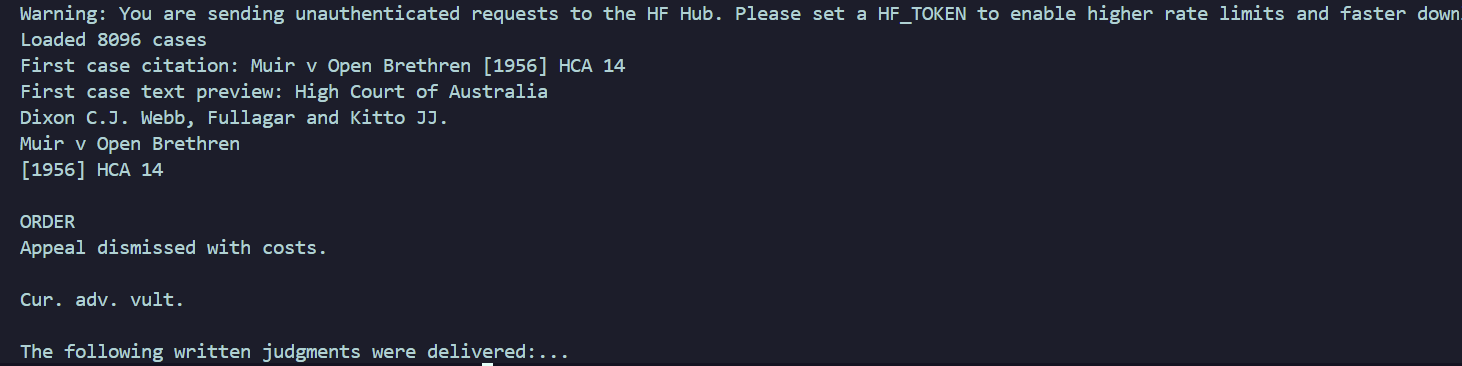
Ignore the Hugging Face warning for now. It won't impact this tutorial.
We just want to check that the cases are loading. Remove the print statements unless you love verbose feedback. The same goes for print statements in future steps.
Prep
Create a variable to store sample size, and then iterate through each case. Retrieving thousands of cases no one really wants to read is a poor use of resources, especially for testing.
Remember the dataset dictionaries with keys? We're iterating through them with a small sample size to check the pipeline works. We'll increase it and compare results later.
## Prepare a sample of cases
sample_size = 3
sample = dataset.select(range(sample_size))

documents = []
for case in sample:
    documents.append({
        "citation": case["citation"],
        "text": case["text"],
    })

print(f"Working with {len(documents)} cases")
We're creating a new dictionary just with the columns of information we want
(citation
and text) as the keys. You can see the rest in the Dataset
Viewer.
Present us is making the data easier to work with for future us.
3. Chunk using semchunk
Import semchunk and then add the code snippet to the bottom:
import os
import semchunk
...
## Set up the chunker
chunk_size = 512 # in tokens
chunker = semchunk.chunkerify("isaacus/kanon-2-tokenizer", chunk_size)chunk_size = 512: 512 tokens is generally a good chunk size for RAG. We want a value that conveys enough meaningful information while fitting in the embedder's context window.semchunk.chunkerify(...)gets passed a tokenizer ("isaacus/kanon-2-tokenizer") and chunk size. Tokenisers split text differently (e.g. 1 token for 'negligence' versus 2 tokens for 'neglig' + 'ence'), so we use the same tokeniser the embedder is trained with. Them agreeing on the split creates better ouput.
Setting up the chunker is naturally followed by using it on the documents:
## Chunk the documents
all_chunks = [] # empty list to collect all chunks

## Casually drop in tqdm for progress bar
for doc in tqdm(documents, desc="Chunking"):

    # Split one document's 'text' data into a list of strings (chunks)
    chunks = chunker(doc["text"])
    for chunk_text in chunks:
        all_chunks.append({
            "text": chunk_text,
            "citation": doc["citation"],
        })

print(f"Created {len(all_chunks)} chunks from {len(documents)} documents")
Result

Ignore the PyTorch warning. We don't need the models it mentions that are unavailable.
Big and Chunky from Madagascar: Escape 2 Africa works as a great earworm at this point.
4. Embeddings
4A. How embedding actually works
It's helpful to understand embedding using the Isaacus API first. We're going to use the Kanon 2 Embedder, which is purpose-built for legal embeddings. There are two types of data we turn into vectors:
- Documents, which is the dataset we've chunked.
- Queries, which is the (typically user) input.
Queries have to be turned into vectors to compare them against document vectors later on.
We're creating embeddings for documents only:
## Embed document chunks
batch_size = 96
all_embeddings = [] # collect all vectors

# loops through all the chunks in the batch
for i in tqdm(range(0, len(all_chunks), batch_size), desc="Embedding"):

    # Grabs all 'text' fields from current chunk batch
    batch_texts = [chunk["text"] for chunk in all_chunks[i:i + batch_size]]

    # Call the Isaacus API to create embeddings for the batch
    response = isaacus_client.embeddings.create(
        model="kanon-2-embedder",
        texts=batch_texts,
        task="retrieval/document",
    )

    # Append everything to the list in input order
    for embedding_data in response.embeddings:
        all_embeddings.append(embedding_data.embedding)

print(f"Created {len(all_embeddings)} embeddings, each with {len(all_embeddings[0])} dimensions")
all_embeddings = []: Remember this eventually needs to get stored
somewhere
permanently.
batch_size: APIs can take a number of chunks in one call. One per API
call is
useless.
task="retrieval/document": Optimisations are different for documents
versus queries.
Result

Cool. We called the API successfully! Delete the code above...
4B. Wrap Isaacus for LangChain
... Because we're going to write it inside a class and wrap it with LangChain. Add the import to the top and then the following code at the end of the file:
from langchain_core.embeddings import Embeddings## Wrap Isaacus embeddings for LangChain
# Inherit from LangChain's Embeddings class
class IsaacusEmbeddings(Embeddings):
# Constructor to access Isaacus client; global vars are not preferred
def __init__(self, client: Isaacus):
self.client = client
# Embedding documents; strangely familiar, no? ;)
def embed_documents(self, texts: list[str]) -> list[list[float]]:
all_embeddings = []
batch_size = 96
for i in range(0, len(texts), batch_size):
batch = texts[i:i + batch_size]
response = self.client.embeddings.create(
model="kanon-2-embedder",
texts=batch,
task="retrieval/document",
)
all_embeddings.extend([e.embedding for e in response.embeddings])
return all_embeddings
# Queries are much shorter...
def embed_query(self, text: str) -> list[float]:
response = self.client.embeddings.create(
model="kanon-2-embedder",
texts=text, # Can pass in a string OR sequence of strings
task="retrieval/query",
)
return response.embeddings[0].embeddingclass IsaacusEmbeddings(Embeddings): We're inheriting from LangChain's
Embeddings base
class. It's expecting embed_documents and embed_query
methods, with
specific return types, and won't work if they're not present. The point of doing is
so we can decide
how the embeddings are created, like choosing which models and properties we'd like
for our use
case.
You won't see anything in the terminal yet.
4C. Build in-memory vector store
We need to store the embeddings so we can search them. The LangChain InMemoryVectorStore
store we use below is for
demos; it's stored in RAM and disappears later. In production vector databases get used, some of
which are directly swappable with InMemoryVectorStore.
Add the import and then the rest of the code:
from langchain_core.vectorstores import InMemoryVectorStore##Create instance of our class and
vector store
embeddings = IsaacusEmbeddings(isaacus_client)
vector_store = InMemoryVectorStore(embedding=embeddings)
texts = [chunk["text"] for chunk in all_chunks]
metadatas = [{"citation": chunk["citation"]} for chunk in all_chunks]
# Add text chunks to the store!!
vector_store.add_texts(texts=texts, metadatas=metadatas)
print(f"Added {len(texts)} chunks to the vector store")textsandmetadatas(odd naming, I know; blame LangChain) are separated and linked using the same ID for each list i.e. texts[1] would pair with metadatas[1]. This is done for accurate searching of the text items. Citations (stored in plain text along the text vectors) are grabbed when the source information is needed.- The
add_textsinvector_store.add_textscalls embed_document under the hood.
Result

5. The R in RAG: retrieval
Time to find the most relevant chunks.
'k' as a variable comes from the k-nearest neighbours (KNN) algorithm. Here it means 'number of nearest neighbours to return'. If k = 20, we're asking for the 20 most relevant chunks.
## Pass in a query and k chunks;
                    return list of dictionaries
def retrieve(query: str, k: int = 20) -> list[dict]:

    # LangChain putting in reps to get relevant chunks
    results = vector_store.similarity_search(query, k=k)

    retrieved = []

    # For every relevant chunk found, add to retrieved list
    for doc in results:
        retrieved.append({
            "text": doc.page_content,
            "citation": doc.metadata.get("citation", "Unknown"),
        })

return retrievedvector_store.similarity_search: LangChain calls our embed_query to turn the input into a vector, compares that vector to the stored chunks, and returns the k most similar chunks.- In
retrieved.appendwe append the relevant text and also the matching citation, where the default value is set to 'Unknown' if it doesn't exist.
Test your results with the following:
# Delete after testing
test_results = retrieve("What is the standard for negligence in Australian law?")
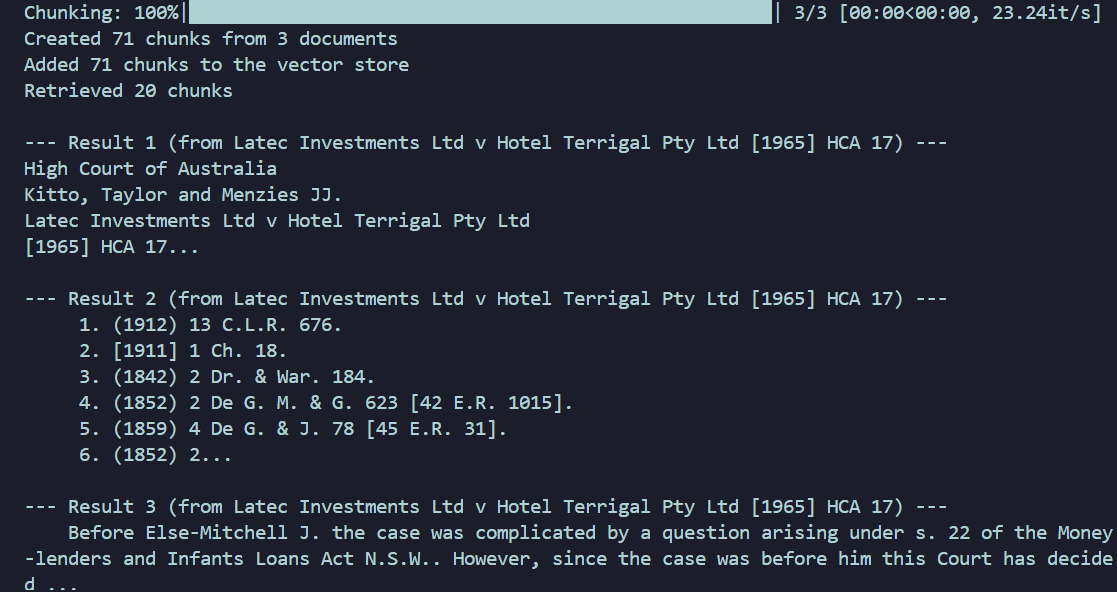
print(f"Retrieved {len(test_results)} chunks")
for i, r in enumerate(test_results[:3]):
    print(f"\n--- Result {i+1} (from {r['citation']}) ---")
    print(r["text"][:200] + "...")
Result
6. Rerank
Woo! We've got a list of relevant chunks to our query. Exciting!
So they are more useful when a question gets asked, we should reorder them so the most relevant ones are first. Kanon 2 Reranker is optimised for legal knowledge.
The reranker works with raw text, so it's fairly accurate but slow. This is why we retrieve broadly then rerank a small subset of information.
We input the query, the retrieved chunks, and the number of ranked items we want kept, and the final list will be that number of items, ranked according to relevance.
Your sample size should be larger than the number of items being taken from the top of the
results (5 in the snippet below). Increase the sample_size from Step 2 to somewhere
between 7 and 50 see better
results. I've used 7.
## Reranking the results
def rerank(query: str, chunks: list[dict], top_n: int = 5) -> list[dict]:

    # The text chunks in strings
    texts = [chunk["text"] for chunk in chunks]

    response = isaacus_client.rerankings.create(
        model="kanon-2-reranker",
        query=query, # The user's question
        texts=texts,
    )

    reranked = []
    for result in response.results[:top_n]:
        original_chunk = chunks[result.index]
        reranked.append({
            "text": original_chunk["text"],
            "citation": original_chunk["citation"],
            "score": result.score,
        })

return rerankedresponse.results: the final list of ranked results, which contains:
- an index (of the original list, so we can find the citation).
- a relevance score.
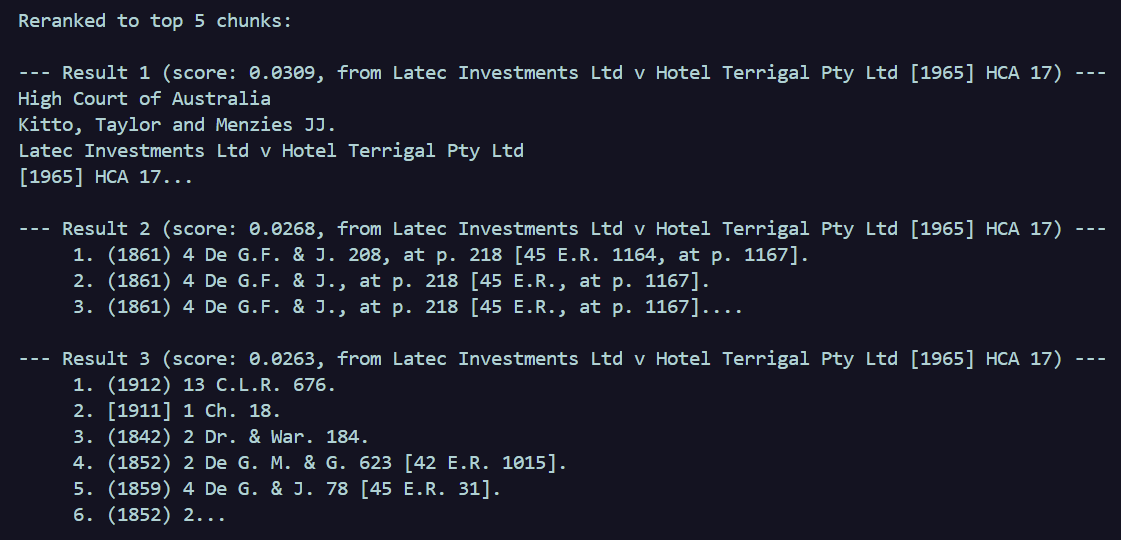
Test it to see how reranking sharpens the results:
# Delete after testing
test_retrieved = retrieve("What is the duty of care in negligence?")
test_reranked = rerank("What is the duty of care in negligence?", test_retrieved)

print(f"\n\nReranked to top {len(test_reranked)} chunks:")
for i, r in enumerate(test_reranked):
    print(f"\n--- Result {i+1} (score: {r['score']:.4f}, from {r['citation']}) ---")
    print(r["text"][:200] + "...")
Results
Before reranking (3 shown of 7 total)
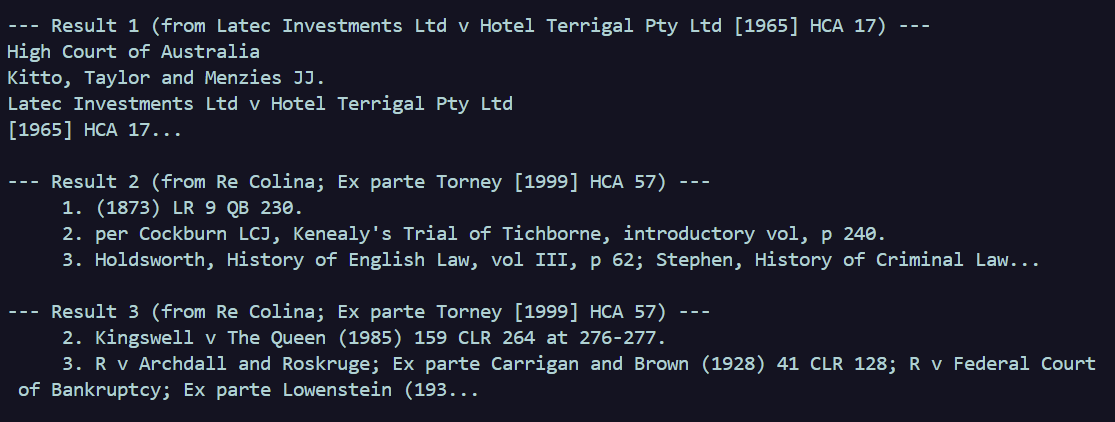
After reranking (3 shown of the 5 requested; 7 total)
7. The G in RAG: generation
The bit everyone is familiar with: prompt engineering!
A user types in a query, and that gets passed to the generate function. In order to control how and when the query hits the LLM, we provide things in order:
- Any LLM instructions and restrictions.
- Context, which we generate from RAG.
- Query itself that must get answered, now supported by 1 and 2.
In this example we're passing the entire prompt to Gemini.
## Generate answer with Gemini
def generate(query: str, context_chunks: list[dict]) -> str:

    # --- is to make chunks readable for us
    context = "\n\n---\n\n".join(
        f"[Source: {chunk['citation']}]\n{chunk['text']}"
        for chunk in context_chunks
    )

    prompt = f"""You are a legal research assistant. Answer the following question based ONLY on the provided context from Australian High Court cases. If the context does not contain enough information to answer, say so.

Cite the specific cases you rely on using their citations.

Context:
{context}

Question: {query}

Answer:"""

    response = gemini_client.models.generate_content(
        model="gemini-2.5-pro",
        contents=prompt,
    )

    return response.text
Now we create one function to:
- Retrieve the relevant chunks based on the user query.
- Rank the chunks based on the user query.
- Generate the answer using 1 and 2.
## Put it all together
def ask(question: str) -> str:
    retrieved_chunks = retrieve(question, k=20)

    reranked_chunks = rerank(question, retrieved_chunks, top_n=5)

    answer = generate(question, reranked_chunks)

    return answer
And that's it!
if __name__ == "__main__":
    answer = ask("What is the test for negligence in Australian law?")
    print(answer)
Results
If we'd asked something relevant, such as 'How is priority determined between competing equitable interests?', we get the following response:
Based on the provided context, the priority between competing equitable interests is determined by the following principles:

The general rule for determining priority between competing equitable interests is the maxim "*qui prior est tempore potior est jure*", which means that if the merits are equal, the interest created first in time is given priority (*Latec Investments Ltd v Hotel Terrigal Pty Ltd* [1965] HCA 17). Equitable interests are generally ranked according to their dates of creation (*Latec Investments Ltd v Hotel Terrigal Pty Ltd* [1965] HCA 17).

However, this rule can be displaced in two main circumstances:

1.  **Unequal Merits:** ...
For the question 'What is the test for negligence in Australian law?', we get the following response:
Based only on the provided context, the test for negligence in Australian law cannot be determined. The provided excerpts from Australian High Court cases do not discuss the legal principles or elements of negligence. The context mentions contempt of court proceedings (*Re Colina; Ex parte Torney [1999] HCA 57*) and provides citations for cases concerning constitutional law and criminal law, but it does not contain any information on the test for negligence.This is partially due to the limited sample size. If you increased the sample size considerably, and there's data to support the second question, it would also be answered.
Effective.
In summary
In short, we've used:
- semchunk for chunking.
- Kanon 2 Embedder for embedding (surprise).
- Kanon 2 Reranker for reranking.
- LangChain as a RAG framework.
- Gemini as the generative model.
It's worth remembering that the in-memory store is ephemeral. Data is lost when the script exits. To save and retrive for experiments, use:
# Save to disk
vector_store.dump("vector_store.json")

# Load from disk later (skipping re-embedding)
vector_store = InMemoryVectorStore.load("vector_store.json", embedding=embeddings)
Good luck with your RAG application and legal outputs! Just don't make like the One Ring and bind them (contractually, of course).